

Before you can create a digital signature, it’s essential to understand what it actually is—and what it isn’t. It’s far more than just a picture of your handwriting on a document. A true digital signature is a sophisticated, tamper-evident seal that guarantees authenticity and integrity.
Let’s clear up one of the biggest misconceptions right away.
What a Digital Signature Really Means
When people talk about signing something electronically, they’re often thinking of a simple electronic signature (or e-signature). This could be an image of your signature, your typed name, or even just a checkmark in a box. While these are often legally valid for everyday agreements, they don’t have the heavy-duty security needed for high-value or highly regulated transactions.
A true digital signature is a different beast entirely. It’s built on a cryptographic framework called Public Key Infrastructure (PKI), making it vastly more secure.
The Technology Behind the Trust
PKI is where the magic happens. It relies on a mathematical process that gives each signer a unique pair of linked digital “keys”:
- A Private Key: This is yours and yours alone. You use it to apply your signature, and it must be kept secret. Think of it as the pen you use to sign, but with a lock only you can open.
- A Public Key: This key is shared openly. Anyone can use it to verify that a signature made with your private key is authentic.
When you sign a document, the software first creates a unique digital fingerprint of the file, called a hash. Your private key then encrypts this hash, which becomes the digital signature that’s permanently attached to the document.
How Verification Works
When someone receives your signed document, their software automatically uses your public key to unlock the signature. It then runs its own hash on the document. If the two hashes match, it confirms two critical facts:
- Authenticity: The signature could only have been created by your private key, proving you are the signer.
- Integrity: The document hasn’t been altered in any way since you signed it. If even a single comma were changed, the hash would be different, and the signature would be invalidated.
It’s this built-in security that makes digital signatures the go-to choice for legal, financial, and real estate documents.
A digital signature isn’t just a signature—it’s a cryptographic guarantee. It proves who signed a document and verifies that the document is exactly as it was when they signed it. This is the gold standard for secure digital agreements.
To give you a clearer picture, here’s a quick breakdown of how these two types of signatures stack up.
Electronic Signature vs Digital Signature Key Differences
| Feature | Simple Electronic Signature (SES) | Digital Signature (PKI-based) |
|---|---|---|
| Verification | Relies on email, IP logs, and basic audit trails. | Cryptographically verified using public/private keys. |
| Security | Basic; vulnerable to forgery or tampering. | High; tamper-evident and cryptographically secure. |
| Identity Proof | Assumed identity based on access (e.g., email inbox). | Verified identity tied to a trusted Certificate Authority (CA). |
| Common Use | Everyday contracts, NDAs, internal approvals. | High-value contracts, legal filings, government documents. |
This comparison highlights why choosing the right tool for the job is so important for compliance and risk management.
The demand for this level of security is exploding. In 2024, the global digital signature market was valued somewhere between USD 7.13 billion and USD 10.5 billion. Experts project it could surge to over USD 70.2 billion by 2030, all driven by the global shift toward secure, compliant digital workflows.
This growth isn’t just a trend; it’s a fundamental change in how business gets done. If you’re looking to learn more about the different types of signatures and their uses, our detailed guide on eSignatures is a great place to start.
Laying the Groundwork for Your First Digital Signature
Before you can apply a truly secure, cryptographic signature, you need the right credentials. Think of it like this: just as you need a driver’s license to prove you can legally drive, you need a digital certificate to prove your identity when signing documents online. This is the bedrock that makes your signature valid and uniquely yours.
So, how do you get one? You’ve got two main routes. The traditional path is going directly to a Certificate Authority (CA), which is a trusted third-party organization that vets identities and issues these digital credentials. The more modern, streamlined approach is to use an all-in-one platform where certificate issuance is baked right into the signing process.
For most professionals—especially in fields like law, finance, or real estate—integrated platforms are a game-changer. A service like BlueNotary handles all the complex verification and certificate management on the back end. This lets you focus on the actual document, not the heavy-lifting tech that makes it all work.
Proving You Are Who You Say You Are
No matter which path you take, you can’t skip the most crucial step: rigorous identity verification. This isn’t like creating a social media profile; it’s a formal process designed to meet demanding legal standards. A CA or platform provider has to be absolutely sure of your identity before they’ll hand over a certificate capable of creating a legally binding signature.
This vetting process isn’t a single checkbox. It’s a multi-layered approach to ensure high assurance. Common methods you’ll encounter include:
- Document Verification: You’ll almost always need to upload a government-issued photo ID, like a passport or driver’s license. Advanced software then scans the document, checking for security features to confirm it’s legit.
- Knowledge-Based Authentication (KBA): This is where you answer a series of multiple-choice questions pulled from your personal credit and public records. They’re often called “out-of-wallet” questions because the answers aren’t something you’d find in a lost wallet.
- Biometric Verification: Many platforms now require a “liveness check.” You’ll be asked to take a selfie or a quick video, and facial recognition technology matches your face to the photo on your ID. It’s a powerful way to prove you are physically present during the verification.
Picture a law firm getting its partners set up to sign client agreements digitally. Each partner goes through this identity-proofing process once. After that, they’re issued a certificate that lets them securely sign countless documents for years to come.
Key Takeaway: The entire strength of a digital signature hinges on the quality of the identity verification behind it. This process is what builds the trust that the signer is who they claim to be, which is non-negotiable for legal enforceability.
Choosing the Right Level of Trust
Not all certificates are created equal. The one you need really depends on what you’re signing and the level of trust the transaction demands. CAs issue certificates with different levels of assurance, which directly reflects how thorough the identity validation was.
For a low-stakes internal document, a simple certificate based on email validation might be enough. But when you’re dealing with high-value contracts that need to hold up under regulations like the ESIGN Act or eIDAS, you need a certificate backed by serious identity proofing.
This is another area where specialized platforms shine. Platforms built for legally sensitive workflows, like Remote Online Notarization (RON), handle this decision-making for you. They automatically use identity verification methods that meet or exceed the legal requirements for notarization, giving you the highest level of assurance. It takes the guesswork out of compliance and helps ensure every signature is rock-solid.
How to Generate Your Digital Signature Certificate
Okay, you’ve picked a provider and done the prep work for identity verification. Now for the main event: creating the actual digital signature certificate. This is the cryptographic key that gives your signature its power, and how you get it really boils down to your toolset.
You can go the hands-on route with dedicated software, or you can let an all-in-one platform handle the heavy lifting for you. Let’s walk through both methods so you can figure out which one makes the most sense for your needs.
No matter which path you choose, the core process is the same: select a trusted authority, prove who you are, and get your certificate.
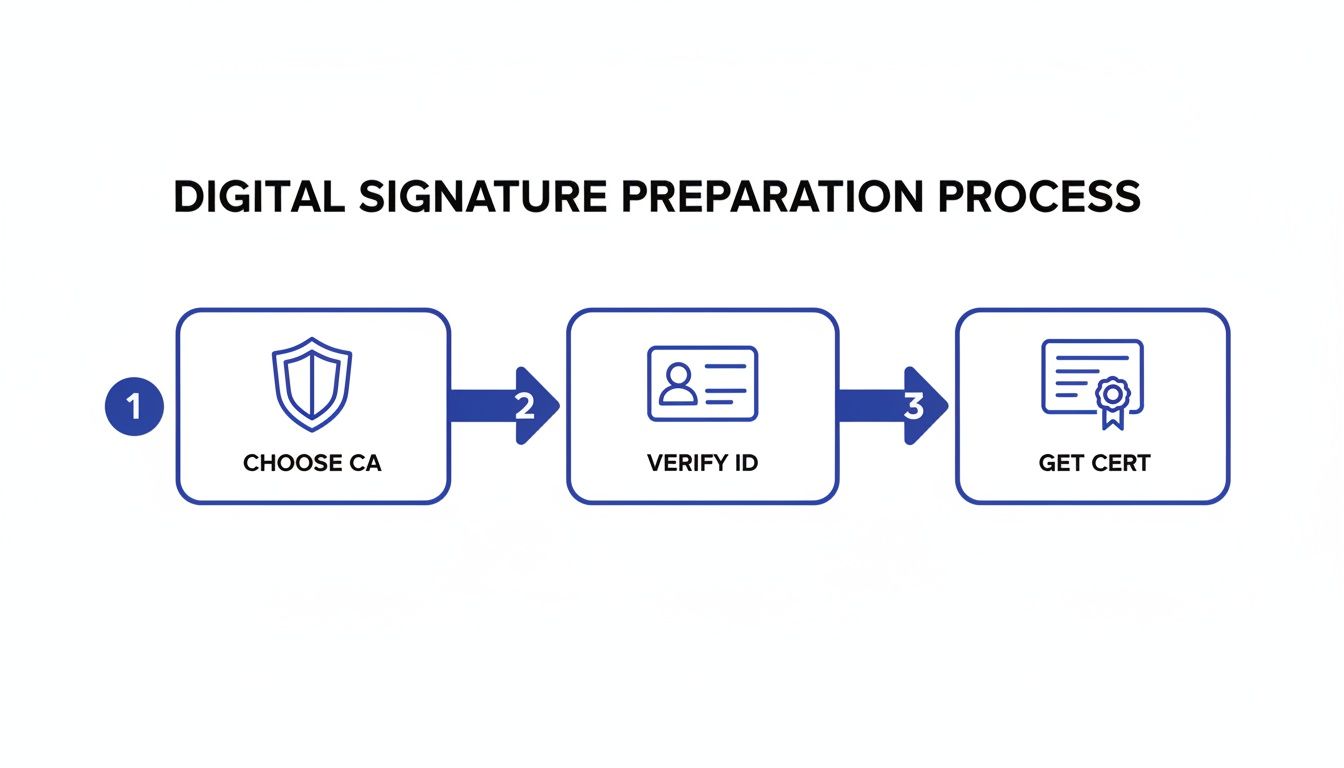
This simple breakdown highlights the essential pillars of any valid digital signature: trust, verification, and issuance.
The Manual, Software-Based Approach
If you like having granular control or are already deep in an ecosystem like Adobe Acrobat Pro, this is likely your path. This method puts you in the driver’s seat of managing your own digital identity.
First, you’ll need to generate a Digital ID, which is essentially a file containing your public and private key pair. While you can create a self-signed Digital ID within an application like Adobe, it won’t hold up for legally binding documents sent to others. For that, you need a certificate from a trusted third-party Certificate Authority (CA).
Here’s what that typically looks like:
- Create a Certificate Signing Request (CSR). This is a block of encrypted text with your details—name, organization, public key—that the CA needs to create your certificate.
- Submit the CSR to the CA. You send this off to your chosen provider, which kicks off their identity verification process.
- Install the Certificate. Once you’re approved, the CA sends back the certificate file. It’s on you to import this file into your software and link it to the private key you generated earlier.
This hands-on approach gives you total control, but it also means the responsibility for security is entirely on you. You have to protect your private key file, manage your passwords, and keep an eye on when your certificate expires. Some professionals even use specialized hardware like e-signature card services to securely store and use their credentials.
The Integrated Platform Method
For most of us in the business world, an integrated platform is a much smoother ride. Services like BlueNotary are built to make all the technical stuff disappear by baking certificate generation right into the workflow.
There’s no need to manually create a CSR or install files. The platform walks you through a one-time identity check, and once you’re verified, its built-in CA issues and manages your digital certificate securely behind the scenes. It just works.
Expert Insight: The real magic of an integrated platform isn’t just convenience—it’s built-in compliance. By automating identity verification and certificate issuance to meet legal standards like the ESIGN Act, these systems slash the risk of human error. You can be confident every signature is created correctly, both technically and legally.
When it’s time to sign a document, you just authenticate yourself (usually with a password or Face ID), and the platform applies your digital signature using the certificate it holds for you. The whole experience is seamless.
Comparing the Two Paths
Let’s put this into a real-world context. Imagine a financial advisor sending a high-value contract to a new client.
| Aspect | Software-Based Approach (e.g., Adobe) | Integrated Platform (e.g., BlueNotary) |
|---|---|---|
| Certificate Setup | Manual CSR generation, CA submission, and certificate installation required. | Automated one-time identity verification and certificate issuance. |
| User Experience | Technical. You need a basic understanding of PKI concepts to get it right. | Intuitive. You just focus on signing the document, not managing keys. |
| Security Burden | You are personally responsible for keeping the private key file safe. | The platform handles secure key storage and lifecycle management for you. |
| Compliance | It’s up to you to ensure your CA and settings meet regulatory demands. | Compliance with major legal frameworks is built directly into the platform. |
The difference is stark. The manual path is for those who need fine-tuned control, while the platform approach is designed for efficiency, security, and simplicity in everyday business. It abstracts away the complexity so you get all the security of a true digital signature without needing a degree in cryptography.
Of course, for less critical tasks, you might just need a simple image of your signature. For those cases, an online signature generator can create a basic e-signature quickly.
Putting Your Digital Signature to Work
You’ve done the hard part and set up your digital certificate. Now comes the easy—and powerful—part: actually signing documents. While applying your signature feels simple, what’s happening under the hood is a sophisticated process that turns a regular file into a secure, tamper-evident legal instrument.
Whether you’re finalizing a PDF contract or a Microsoft Word agreement, most modern software has built-in digital signature features. You’ll typically find an option like “Sign” or “Add Signature.” Clicking this will prompt you to choose your certificate and enter the password for your private key.
The moment you confirm, two things happen instantly. First, the software generates a unique hash—think of it as a digital fingerprint—of the document in its exact current state. Then, it encrypts that fingerprint using your private key and embeds it directly into the document’s metadata.
This creates a powerful cryptographic seal. Anyone who opens the document later can instantly verify its authenticity and see that not a single character has been changed since the moment you signed.
The Power of the Timestamp
A critical piece of the puzzle that goes along with your signature is the secure timestamp. When you sign, the platform often pings a trusted, independent Timestamping Authority (TSA). This TSA adds a verifiable record of the exact date and time the signature was applied.
This isn’t just for record-keeping. The timestamp provides a crucial layer of non-repudiation, proving that your signature and the document existed in that specific form at a precise moment. It makes it incredibly difficult for anyone to later dispute the signing event.
Digital Signatures in Advanced Workflows
Beyond just signing a single document, digital signatures are the engine behind complex and highly regulated professional workflows. Remote Online Notarization (RON) is a perfect example, as the entire process hinges on the security provided by these signatures.
In a RON session, the digital signature isn’t just an “I agree.” It’s the final act of a legally prescribed ceremony. Here’s what makes it so robust:
- Integrated Identity Verification: The signing is directly tied to the rigorous identity proofing—like knowledge-based questions and biometric checks—that took place just moments before.
- Live Audio-Video Recording: The entire transaction, including the physical act of signing, is recorded and stored, creating an undeniable record of what happened.
- Comprehensive Audit Trail: Every single action, from the signer logging in to the final signature application, is logged in a detailed, tamper-evident trail.
For a law firm executing an estate plan or a title company closing on a house, this multi-layered security provides an exceptionally high level of legal assurance. The digital signature is the verifiable capstone on a much larger compliance process.
The real value of a digital signature isn’t just in the signature itself, but in the verifiable, auditable context surrounding it. In high-stakes transactions, this context is what provides legal durability and peace of mind.
Once you get comfortable with your digital signature, you’ll see how it can fit into all sorts of business processes. It’s worth exploring how modern document automation software that streamlines e-signatures can weave this capability seamlessly into your daily operations.
Economic and Efficiency Gains
The shift to digital signatures isn’t just a security upgrade; it’s a massive boost to business efficiency. The economic upside is what has fueled its rapid adoption. Between 2020 and 2026, the global digital signature market exploded from USD 4.1 billion to USD 19.8 billion, growing at a blistering pace of over 30.8% annually.
This isn’t just abstract growth—it reflects real-world savings as companies slash paper costs, ditch physical storage, and cut down contract execution times from weeks to just a few hours. If you want to dig into the numbers, you can find more details in the full research on digital signature market trends.
Making Sure Your Digital Signatures are Legally Binding
Creating a cryptographically secure signature is a fantastic technical achievement, but let’s be honest—its real power comes from its legal recognition. A digital signature is only as valuable as its ability to hold up in court. The good news is that a solid legal framework exists to make this happen, but you absolutely have to ensure your process ticks all the right boxes.
For anyone doing business in the United States, two major pieces of legislation are the bedrock of digital signature law: the Electronic Signatures in Global and National Commerce Act (the ESIGN Act) and the Uniform Electronic Transactions Act (UETA). These laws essentially grant electronic records and signatures the same legal weight as their ink-and-paper counterparts, but only if certain conditions are met.
So, what are those conditions? It’s not enough to just slap a signature onto a PDF. The law is looking for clear proof of a person’s intent to sign, their consent to do business electronically in the first place, and a secure process that irrefutably links that specific person to that specific document.
The Anatomy of a Legally Sound Signature
To meet the standards set by laws like the ESIGN Act and UETA, your digital signing process needs to nail a few key elements. Think of these as the pillars that support your signature’s legal enforceability.
- Intent to Sign: The person signing has to clearly show they mean to sign the document. This is usually handled with an obvious action, like clicking a button that says “Sign” or “I Agree.” There can be no ambiguity.
- Consent to Electronic Records: Before they even see the signature line, signers must explicitly agree to conduct the transaction electronically. This is typically done with a disclosure notice they have to read and accept.
- Association of Signature with the Record: The system must maintain a crystal-clear record that connects the signature to the exact version of the document that was signed.
- Record Retention: The final, signed document has to be stored securely and remain accessible to everyone involved for future reference.
These principles ensure that an electronic signature is treated as a deliberate, recorded act—just like signing a paper contract in front of a witness.
The Audit Trail: Your Unseen Legal Witness
This brings us to a concept that is absolutely critical: the audit trail. A comprehensive audit trail is your digital evidence locker. It’s a detailed, timestamped log that captures every single action related to the signing event, from start to finish.
Picture a high-stakes real estate deal. The audit trail would capture who opened the document, the exact time they viewed it, every step they took to verify their identity, and the precise moment they applied their signature. Platforms like BlueNotary are built specifically to create these tamper-evident records automatically. This provides an incredibly robust log that can be presented as evidence if a legal dispute ever arises.
This is especially vital for complex processes like notarizations, where the integrity of the signing ceremony is everything. If you’re managing these kinds of transactions, getting familiar with the specifics of remote online notary platforms isn’t just a good idea—it’s essential for compliance.
The audit trail transforms a signature from a simple mark on a document into a verifiable, legally defensible event. It tells the complete story of the transaction, providing the who, what, when, and how needed to prove its validity.
The global regulatory environment has really pushed the adoption of secure digital signature solutions forward. Regulations like GDPR and CCPA now demand that businesses implement secure systems to protect data and maintain consumer trust. This has spurred industries, especially the Banking, Financial Services, and Insurance (BFSI) sector—which holds a massive 26.2% market share—to adopt compliant digital signature technologies. You can learn more about these market drivers and industry standards to better understand how compliance is shaping the technology we use.
Got Questions About Digital Signatures? Let’s Clear Things Up.
Even after you’ve got the basics down, you’ll probably still have a few questions when it’s time to actually create and use a digital signature. That’s perfectly normal. Getting comfortable with the details is what separates casual use from professional, legally-sound implementation.
Let’s walk through some of the most common questions I hear from professionals diving into secure digital document workflows.
How Long Does My Digital Signature Certificate Last?
This is a great first question. A digital signature certificate isn’t permanent, and that’s actually a good thing. For security, these credentials have a built-in expiration date. Think of it as a safety feature that limits the window of opportunity for mischief if your private key were ever compromised.
Generally, a certificate from a trusted Certificate Authority (CA) is valid for one to three years. The exact lifespan depends on the provider and the specific type of certificate you get. Don’t worry about forgetting—your provider will send you reminders when it’s time to renew. Renewing is critical to keep signing documents without a hitch.
The renewal process itself is pretty straightforward. It usually just involves a quick identity re-verification to confirm you’re still you. It’s a small but vital step in maintaining the integrity of the whole system.
Can Someone Change a Document After I’ve Digitally Signed It?
This question hits on the single most important feature of a digital signature. The answer is a hard no. Once you apply a digital signature, the document is cryptographically locked down.
Here’s how it works: the signature creates a unique digital “fingerprint” (called a hash) of the document at the precise moment you sign it. If anyone tries to alter the document afterward—even by changing a single comma or adding a space—the document’s fingerprint changes.
When the next person opens the file, their software automatically re-calculates the fingerprint and checks it against the one embedded in your signature. If they don’t match, the system immediately flags the signature as invalid.
This tamper-evident seal is the bedrock of a true digital signature. It provides an undeniable guarantee that the document is in its original, unaltered state, giving everyone involved complete confidence.
Are Digital Signatures Legally Binding Everywhere?
For the most part, yes. Digital signatures have a solid legal footing across the globe. In the United States, landmark laws like the ESIGN Act and UETA give them the same legal weight as a wet-ink signature. Over in the European Union, the eIDAS regulation does the same thing, creating a consistent standard for all member countries.
But here’s a pro-tip: “legally accepted” doesn’t mean “universally accepted without question.” Some government bodies, courts, or highly regulated industries might have their own specific standards or require certain types of certificates. For major contracts or cross-border deals, it’s always smart to double-check the local rules.
The worldwide trend is definitely moving toward full acceptance, but a little due diligence on your specific use case ensures your agreements are bulletproof, no matter where you do business.
Ready to move beyond questions and start signing with confidence? BlueNotary provides a complete solution for secure digital signatures, identity verification, and compliant online notarization. Our platform is designed to make the entire process seamless for professionals in real estate, law, and finance. Discover how you can elevate your document workflows at bluenotaryonline.com.