
When a notary applies their traditional rubber stamp to a paper document, that physical seal provides limited protection. Someone with access to the document could potentially alter its contents, forge a new seal, or even replace entire pages without detection. Digital notarization solves this vulnerability through tamper-evident technology that makes any unauthorized modification immediately visible.
Understanding how digital certificates and tamper-evident seals work demystifies the technology protecting your notarized documents. While the underlying cryptography involves complex mathematics, the concepts are straightforward and the benefits are substantial.
What Makes a Digital Seal “Tamper-Evident”
A tamper-evident seal does not prevent someone from attempting to modify a document. Instead, it ensures that any modification becomes immediately detectable. Think of it like the security seal on a medicine bottle: someone could still open the bottle, but the broken seal reveals that tampering occurred.
Digital tamper-evidence works through cryptographic technology that creates a mathematical relationship between the document’s contents and the seal applied to it. When the notary completes a remote online notarization, the platform applies a digital seal that is mathematically linked to every character, image, and element in the document. Change even a single space or period, and the mathematical relationship breaks, revealing that alteration has occurred.
This protection operates automatically without requiring any action from the person reviewing the document. Standard PDF viewers like Adobe Acrobat recognize tamper-evident seals and display warnings when documents have been modified after signing.
Public Key Infrastructure Basics
The technology underlying digital seals is called Public Key Infrastructure, commonly abbreviated as PKI. While PKI involves sophisticated mathematics, understanding how it works conceptually requires no technical background.
The Two-Key System
PKI relies on paired keys that work together: a private key and a public key. These keys are long strings of characters generated using mathematical algorithms that create a special relationship between them.
The private key remains secret, known only to its owner. For notaries, this private key is securely stored and protected, often within hardware security modules that prevent unauthorized access or copying. The notary uses this private key to create digital signatures and seals.
The public key is shared openly. It can be distributed to anyone who needs to verify documents signed with the corresponding private key. The public key is typically embedded in a digital certificate that identifies its owner.
Here is the crucial feature of this system: anything encrypted with the private key can only be decrypted with the matching public key, and vice versa. This mathematical relationship enables both secure communication and reliable verification.
How the Keys Work Together
When a notary digitally signs a document, they use their private key to create a unique digital signature. Anyone with access to the notary’s public key can verify that signature, confirming both that the document came from that specific notary and that it has not been altered.
Because only the notary possesses the private key, no one else can create valid signatures in their name. And because the public key can verify signatures but cannot create them, sharing it publicly creates no security risk.
This asymmetric system solves a fundamental problem with traditional security: how to verify authenticity without sharing secrets that could be misused.
How Hashing Detects Tampering
The mathematical process that enables tamper detection is called hashing. A hash function takes any input, whether a single word or an entire document, and produces a fixed-length output called a hash value or digest. This hash acts like a unique fingerprint for the document’s contents.
Creating Document Fingerprints
Hash functions have several properties that make them ideal for tamper detection. The same input always produces the same hash, meaning a document’s fingerprint never changes unless the document itself changes. Even tiny changes produce completely different hashes, so altering a single character transforms the fingerprint entirely. Reconstructing the original document from its hash is computationally impossible, protecting document contents from reverse engineering. Different documents producing the same hash is extremely unlikely, making collisions practically non-existent.
When a notary signs a document digitally, the system first creates a hash of the entire document contents. This hash becomes the basis for the digital signature that gets attached to the document.
The Verification Process
When someone later opens the document, verification happens automatically through a straightforward process. The viewing software extracts the hash that was encrypted when the document was signed. It uses the notary’s public key to decrypt that hash. Simultaneously, it calculates a fresh hash of the current document contents. Finally, it compares the decrypted original hash to the newly calculated hash.
If the hashes match, the document is verified as unaltered since signing. If they differ, even slightly, the software knows tampering has occurred.
This process happens instantly and invisibly. When you open a digitally signed PDF in Adobe Acrobat, the software performs this verification automatically and displays the results.
Certificate Authorities and Trust
Anyone could theoretically generate a public-private key pair and claim to be a notary. To prevent this, the PKI system includes trusted third parties called Certificate Authorities that verify identities before issuing digital certificates.
What Certificate Authorities Do
A Certificate Authority (CA) validates the identity of certificate applicants before issuing credentials. For notaries, this means verifying that the applicant holds a valid notary commission from their state.
The verification process varies by certificate type but typically involves confirming the applicant’s identity through government-issued identification, verifying their notary commission status with state authorities, validating their authority to perform the types of notarizations they will conduct, and binding their verified identity to their public key through a digital certificate.
Once satisfied, the CA issues a digital certificate containing the notary’s public key along with identifying information. The CA digitally signs this certificate with its own private key, vouching for its accuracy.
The Chain of Trust
Certificate authorities operate within a hierarchical structure called the chain of trust. At the top are root certificate authorities, whose certificates are pre-installed in operating systems, browsers, and software like Adobe Acrobat. These root CAs are trusted by default because software manufacturers have verified their legitimacy.
Root CAs issue certificates to intermediate CAs, which in turn issue certificates to end users like notaries. When verifying a digital signature, software traces this chain from the notary’s certificate up through intermediate CAs to a trusted root. If the chain is intact and all certificates are valid, the signature is trusted.
This hierarchical structure allows trust to scale across millions of certificates without requiring users to personally verify each one. The burden of verification falls on the CAs, who stake their business reputation on accurate validation.
Revocation and Validity
Certificates are not permanent. They expire after set periods, typically one to three years, requiring renewal. Additionally, if a private key is compromised or a notary’s commission is revoked, the certificate can be invalidated before its expiration date.
When verifying signatures, software checks whether certificates have been revoked through mechanisms called Certificate Revocation Lists (CRLs) or the Online Certificate Status Protocol (OCSP). These systems provide real-time information about whether a certificate remains valid.
X.509 Certificates for Notaries
The standard format for digital certificates used in notarization is X.509. Most state RON laws require notaries to use X.509-compliant certificates issued by trusted certificate authorities.
What the Certificate Contains
An X.509 certificate includes several key elements. The notary’s public key enables signature verification. Subject information identifies the certificate holder, including the notary’s name and possibly their commission number. The issuer field names the Certificate Authority that issued the certificate. Validity period dates specify when the certificate becomes active and when it expires. Serial numbers uniquely identify each certificate. Finally, the digital signature from the issuing CA vouches for the certificate’s authenticity.
When embedded in a notarized document, this information allows anyone to verify both the notary’s identity and the document’s integrity.
How Notaries Obtain Certificates
Most states require notaries performing remote online notarizations to obtain X.509 certificates from approved providers. Common certificate authorities serving notaries include IdenTrust, which partners with many RON platforms to provide compliant certificates.
The process typically involves submitting an application with identity documentation, verification of active notary commission, payment of certificate fees, secure generation and delivery of the private key, and installation of the certificate into the RON platform.
Many RON platforms simplify this process by integrating certificate management directly into their systems. The platform handles certificate application, renewal, and integration, so notaries do not need to manage complex PKI configurations themselves.
What Happens When Someone Alters a Document
Understanding what occurs when tampering is attempted illustrates why digital seals provide such strong protection.
The Tampering Scenario
Suppose someone obtains a notarized PDF and attempts to modify it. Perhaps they want to change a date, alter a dollar amount, or add text that was not in the original document. They open the PDF in editing software and make their changes.
The moment they modify the document’s contents, the mathematical relationship between the document and its digital seal breaks. The hash of the modified document no longer matches the hash that was encrypted when the notary signed the original.
Detection Upon Opening
When anyone opens the modified document in a standards-compliant PDF viewer, the software automatically performs verification. It extracts the encrypted hash from the digital signature, decrypts it using the notary’s public key embedded in the certificate, calculates a fresh hash of the current document contents, and compares the two hashes.
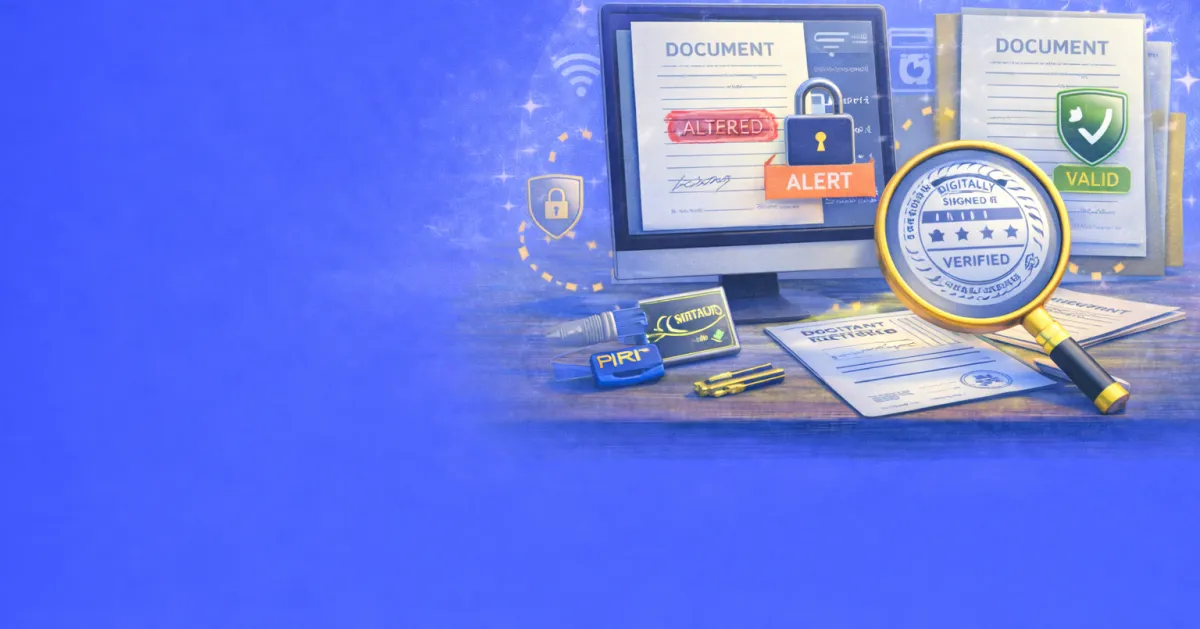
Because the hashes do not match, the software displays a warning. Adobe Acrobat shows messages like “The document has been altered or corrupted since the signature was applied” or “There have been subsequent changes to the document.” The signature status changes from valid to invalid, often displayed with visual indicators like a red X instead of a green checkmark.
Why Forgery Is Impractical
Could someone create a new valid signature for the altered document? This would require access to the notary’s private key, which is securely protected and never shared. Without the private key, creating a valid signature is computationally impossible with current technology.
Could someone create their own certificate claiming to be the notary? This would require deceiving a Certificate Authority during the identity verification process. And even if they obtained a fraudulent certificate, it would not chain to a trusted root and would fail verification.
The combination of cryptographic protection and the CA trust hierarchy makes forgery practically impossible while making detection automatic and reliable.
How to Verify a Digital Seal
Anyone who receives a notarized digital document can verify its authenticity without special expertise or tools.
Using Adobe Acrobat or Reader
The most common method for verifying digital signatures uses Adobe Acrobat or the free Adobe Reader. When you open a digitally signed PDF, look for the signature panel or security indicators at the top of the document.
A valid, unaltered document displays a green checkmark and messages confirming the signature is valid and the document has not been modified. The signer’s name appears along with the date and time of signing. You can click on the signature to view detailed information about the certificate, including the Certificate Authority that issued it and the certificate’s validity period.
An altered or problematic document displays warnings with red or yellow indicators. The software specifies the nature of the problem, whether the document was modified, the certificate is expired or revoked, or the certificate authority is not trusted.
Online Verification Tools
Several online services allow you to upload PDFs for signature verification. These tools check whether the document contains valid digital signatures, whether any modifications occurred after signing, whether the signing certificate was valid at the time of signing, and whether the certificate chains to a trusted root.
These services are useful when you do not have access to Adobe software or want independent verification.
What to Look For
When verifying a notarized document, confirm several elements. The signature status should show as valid with no modification warnings. The signer’s name should match the expected notary. The signing date should align with when the notarization occurred. The certificate should be issued by a recognized Certificate Authority. The certificate should not be expired or revoked.
If any of these elements raises concerns, request a new copy of the document or contact the notary to resolve the discrepancy.
Long-Term Validation
Digital certificates expire, typically within one to three years. This raises a question: how can documents be verified years or decades after signing, when the original certificate may have expired?
The LTV Standard
Long-Term Validation (LTV) addresses this concern by embedding all information needed for verification directly within the document at the time of signing. This includes the complete certificate chain from the signing certificate to the root CA, certificate revocation information current as of signing, and a trusted timestamp proving when the signature was applied.
With LTV information embedded, documents can be verified indefinitely. Even if the original certificate has expired, verifiers can confirm that the certificate was valid at the moment of signing.
Trusted Timestamps
A trusted timestamp proves that a document existed in its current form at a specific moment. Timestamp authorities, which are trusted third parties similar to Certificate Authorities, issue these timestamps.
When a document is signed with a trusted timestamp, the timestamp authority creates a digitally signed record of exactly when the signature was applied. This prevents backdating or claims that a document was signed at a different time than it actually was.
For notarized documents, trusted timestamps provide important evidence of when the notarization occurred, supporting the document’s legal validity.
Protection Beyond Traditional Notarization
Digital tamper-evident technology provides protections that traditional paper notarization cannot match.
Advantages Over Paper
Paper documents are vulnerable in ways digital documents are not. Physical pages can be replaced without detection. Signatures can be forged. Ink can be altered. Pages can be added or removed. Traditional notary seals can be replicated.
Digital seals address each vulnerability. The entire document is cryptographically bound together, making page substitution detectable. Signatures cannot be forged without the private key. Any alteration, however small, triggers tamper detection. The document’s integrity can be verified instantly by anyone with standard software.
Embedded Evidence
Digital notarization also embeds richer evidence than paper documents can provide. The complete audit trail of the notarization session can be associated with the document. The notary’s verified identity and commission information are cryptographically linked. Timestamps provide precise proof of when events occurred. Identity verification results confirm who was present.
This embedded evidence strengthens the document’s legal standing and simplifies verification when questions arise.
Protecting Your Private Key
For notaries, the private key represents the foundation of their digital identity. If compromised, it could allow others to forge signatures in their name.
Security Measures
RON platforms implement multiple security measures to protect private keys. Hardware Security Modules (HSMs) store keys in tamper-resistant hardware that prevents extraction. Multi-factor authentication requires more than a password to access signing capabilities. Audit logging tracks all key usage. Regular certificate renewal limits the window of exposure if compromise occurs.
Notaries should never share their private keys or the credentials that provide access to them. If a private key is ever compromised, the certificate must be revoked immediately to prevent misuse.
What Compromise Would Mean
If someone obtained a notary’s private key, they could create valid digital signatures on any document. These forged signatures would pass verification because they use the authentic key.
However, this is where revocation systems provide protection. Once the notary reports the compromise, the Certificate Authority revokes the certificate. From that point forward, verification systems recognize the certificate as invalid. While documents signed before revocation remain problematic, new forgeries become detectable.
Frequently Asked Questions
Can I verify a digital signature without internet access?
Yes, for basic verification. PDF readers can check the document’s hash and signature without connecting to the internet. However, checking whether a certificate has been revoked typically requires an internet connection to query revocation databases.
What if Adobe Acrobat does not recognize the Certificate Authority?
If the signing certificate does not chain to a root CA that Adobe trusts by default, you may see an “unknown” status rather than “valid.” This does not necessarily indicate a problem. You may need to manually add the root certificate to your trusted list if you have verified the CA’s legitimacy through other means.
How long are digital signatures valid?
The signature itself does not expire, but the certificate used to create it does. Documents with Long-Term Validation (LTV) information embedded remain verifiable indefinitely because they contain all needed verification data from the time of signing.
Can I print a digitally signed document and have it retain its protection?
No. When you print a digital document, you create a paper copy that loses all cryptographic protection. The printed version cannot be verified digitally. For this reason, the electronic version should be retained as the authoritative copy.
What happens if the RON platform goes out of business?
Properly implemented digital signatures are self-contained within the document. You do not need to contact the RON platform to verify a signature. As long as the certificate chains to a trusted root CA, verification works independently of the platform that facilitated signing.
Are digital seals legally equivalent to traditional notary seals?
Yes, in states that authorize remote online notarization. State laws specifically recognize digital seals and signatures as having the same legal effect as traditional physical seals. Federal laws including the ESIGN Act and UETA support this equivalence.
Can someone remove a digital signature from a document?
Someone could remove the signature data from a PDF, but this would be obvious upon inspection. The document would no longer show as signed, eliminating any claim to notarization. The act of removing a signature provides no benefit to a forger.
How can I tell if a document was signed by a legitimate notary?
Check the certificate details embedded in the signature. Verify the notary’s name and confirm their commission status with their commissioning state. Ensure the certificate was issued by a recognized Certificate Authority. Most states maintain databases where you can verify notary commissions.
Conclusion:
Tamper-evident digital seals represent a significant advancement in document security. Through the mathematics of public key cryptography, hash functions, and the trust infrastructure of Certificate Authorities, notarized documents gain protection that paper could never provide.
Every element of a digitally notarized document is cryptographically bound to the notary’s verified identity. Any modification, however small, becomes immediately detectable. Verification requires no special expertise and can be performed instantly using standard software.
For documents requiring authentication and protection against alteration, remote online notarization with tamper-evident digital seals provides security that strengthens over time as traditional paper documents degrade. When you need this level of protection for your important documents, BlueNotary offers remote online notarization services with fully compliant digital certificates and tamper-evident sealing technology.