So, you need to get a document notarized. What are your options?
You essentially have three ways to get it done: the old-school way at a notary’s office, having a notary come to you, or doing it all online. No matter which route you choose, the core requirements are the same: you’ll need a valid, government-issued photo ID, and you must sign the document in front of a commissioned notary.
Your Guide to Modern Notarization Options
Long gone are the days of rushing to the bank on your lunch break just to find a notary. Today’s notarization landscape is much more accommodating, with options built for speed, convenience, and just about any situation you can think of. Figuring out the differences is the key to choosing the right one for your specific needs.
Whether you’re finalizing a personal power of attorney or your business processes hundreds of client contracts a month, the method you pick will directly affect how much time and money you spend.
Comparing Notarization Methods
Let’s break down the three main paths. Your choice will likely hinge on a simple trade-off between urgency, your physical location, and how comfortable you are with using technology.
- Traditional In-Person Notarization: This is the classic approach. You find a local notary—think banks, shipping stores, or law offices—and bring your documents and ID to them. It’s a reliable, familiar process, but you’re at the mercy of their business hours and availability.
- Mobile Notarization: A great option for convenience. A mobile notary travels to a location that works for you, whether it’s your home, office, or even a hospital room. It’s perfect for anyone with a tight schedule or mobility challenges, though you’ll pay a premium for the travel service.
- Remote Online Notarization (RON): This is the modern, digital solution. Using a secure audio-video platform, you can connect with a commissioned notary from literally anywhere you have an internet connection. RON offers incredible speed and convenience, with the entire process often wrapped up in just a few minutes.
Still not sure which way to go? This flowchart can help you think through the decision based on your circumstances.
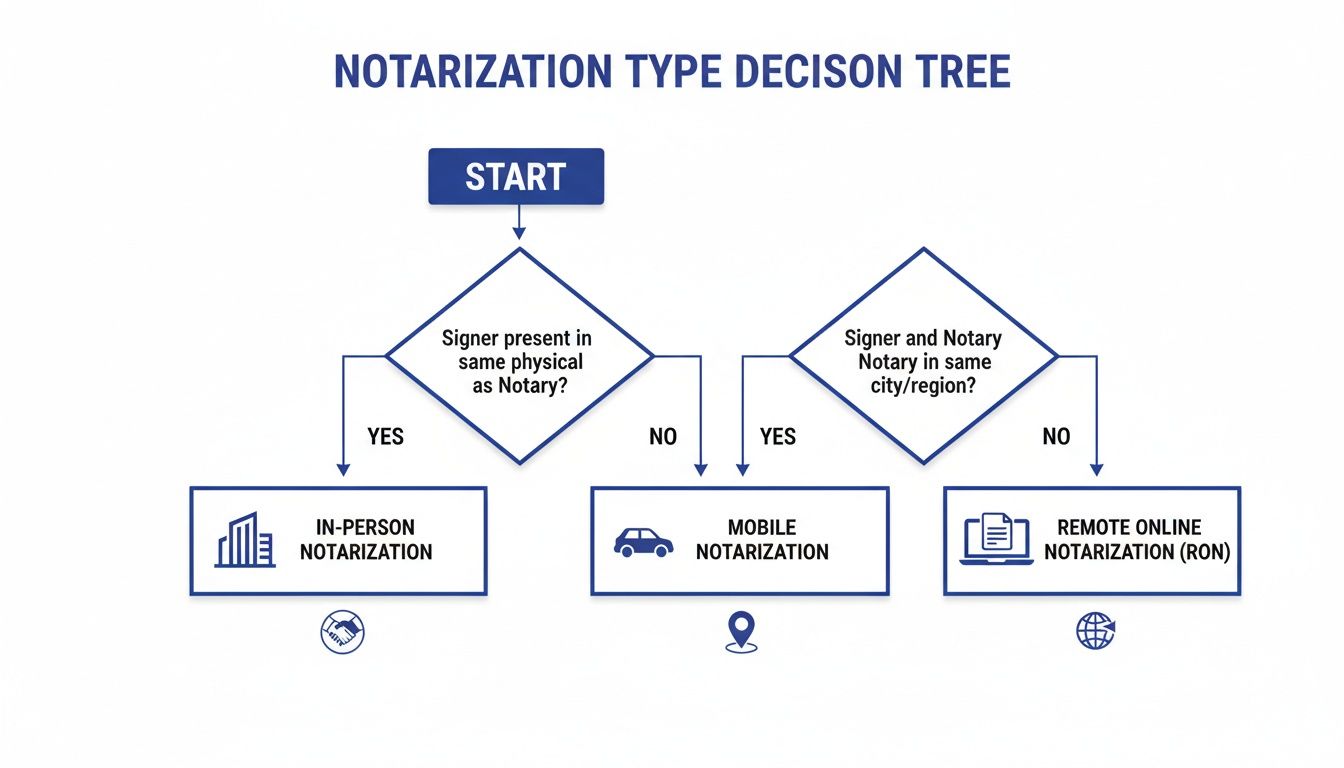
As you can see, factors like how quickly you need it done and whether you can travel easily point you toward the most practical choice.
Notarization Methods at a Glance
To make it even clearer, here’s a quick side-by-side look at how the three main notarization methods stack up against each other.
| Feature | In-Person Notary | Mobile Notary | Remote Online Notarization (RON) |
|---|---|---|---|
| Location | You travel to the notary’s office (e.g., bank, law firm) | Notary travels to your location (home, office, hospital) | Anywhere with an internet connection |
| Convenience | Low; requires travel and adherence to business hours | High; meets you on your schedule and at your location | Highest; available 24/7 from any device |
| Speed | Can be immediate if available, but scheduling may be slow | Slower; requires scheduling and travel time for the notary | Fastest; typically completed in under 15 minutes |
| Cost | Lowest; usually a small, state-regulated fee per signature | Higher; includes state fee plus significant travel charges | Moderate; typically a flat fee per session (e.g., $25) |
| Technology Required | None | None for the signer | Computer/smartphone with camera, microphone, and internet |
| Security | Relies on physical ID check and wet ink signature | Relies on physical ID check and wet ink signature | Multi-factor ID verification, KBA, and a tamper-evident audit trail |
This table should give you a good feel for the trade-offs involved with each option, helping you match the service to your specific needs.
The move toward digital services isn’t just a trend; it’s a fundamental shift, especially in the legal and financial worlds where security and efficiency are everything. The power to execute critical documents securely from anywhere has gone from a nice-to-have to a business necessity.
This shift is picking up serious steam. The global market for online notary software was valued at $1.28 billion in 2025 and is projected to reach $2.11 billion by 2032. That growth is built on a proven track record—in 2020 alone, 1.5 million remote notarizations were completed, solidifying RON as a trusted method for high-stakes transactions.
You can dive deeper into the nuts and bolts of these services in our complete guide to online notary services.
Getting Ready for Your In-Person or Mobile Notary Visit

When you’re going the traditional route with an in-person or mobile notary, a little prep work can make all the difference. Being prepared means you can get your documents stamped and be on your way without any hitches or the need for a second trip.
Your first move is to find a notary. You’d be surprised how many local businesses have one on staff. Here are the usual spots:
- Banks and Credit Unions: Most banks have a notary public. If you’re a customer, the service is often free.
- Shipping Stores: Places like The UPS Store and FedEx Office are reliable bets for finding a notary during business hours.
- Law and Real Estate Offices: These professionals deal with notarized documents daily, so they almost always have a notary available.
- Government Buildings: Your local city hall or county clerk’s office is another solid option.
If you need someone to come to you, a quick search for a “mobile notary near me” will pull up professionals who travel. This service is a lifesaver for hospital signings, helping elderly relatives, or when you’re just stuck in a time crunch.
What to Bring to the Appointment
Once you’ve found your notary, it’s time to get your ducks in a row. Having everything you need is the key to a quick and painless process. You’ll need the document itself, a valid ID, and anyone else who needs to sign or witness.
Here’s the biggest mistake I see people make: they sign the document before they get to the notary. Do not sign your document beforehand. The whole point is for the notary to watch you sign it. If you sign it early, you’ll have to start over with a fresh copy.
A notary’s job boils down to two key things: verifying who you are and making sure you’re signing without being forced to. If you’ve already signed, they can’t legally say they witnessed it.
You absolutely must bring a valid, government-issued photo ID. The key word here is valid—it cannot be expired. Notaries are legally prohibited from accepting expired IDs, no exceptions.
Common forms of acceptable ID include:
- State-issued driver’s license
- State-issued ID card
- U.S. passport or passport card
- U.S. military ID
Give your ID a quick check before you head out the door. An expired license is the fastest way to get turned away.
Making Sure Everything Goes Smoothly
Aside from having your documents and ID, a couple of other details can make or break the appointment. First, every single person who needs to sign the document must be there in person. If a required signer is missing, the notary can’t proceed.
Each signer also has to be fully aware and signing on their own accord. Don’t be surprised if the notary makes a little small talk; they’re gauging whether you understand what you’re signing. It’s a standard procedure to prevent fraud. If a notary suspects someone is confused, disoriented, or being pressured, they have to refuse the service. Our guide on what to expect during in-person notarization digs deeper into this process.
Finally, give your document one last look for any blank spaces. The notary isn’t responsible for the content, but they can refuse to notarize something with big empty sections that could be filled in later. Fill out everything except for the signature and date lines—you’ll handle those during the appointment. A few minutes of prep can save you a world of headaches.
Understanding Remote Online Notarization (RON)
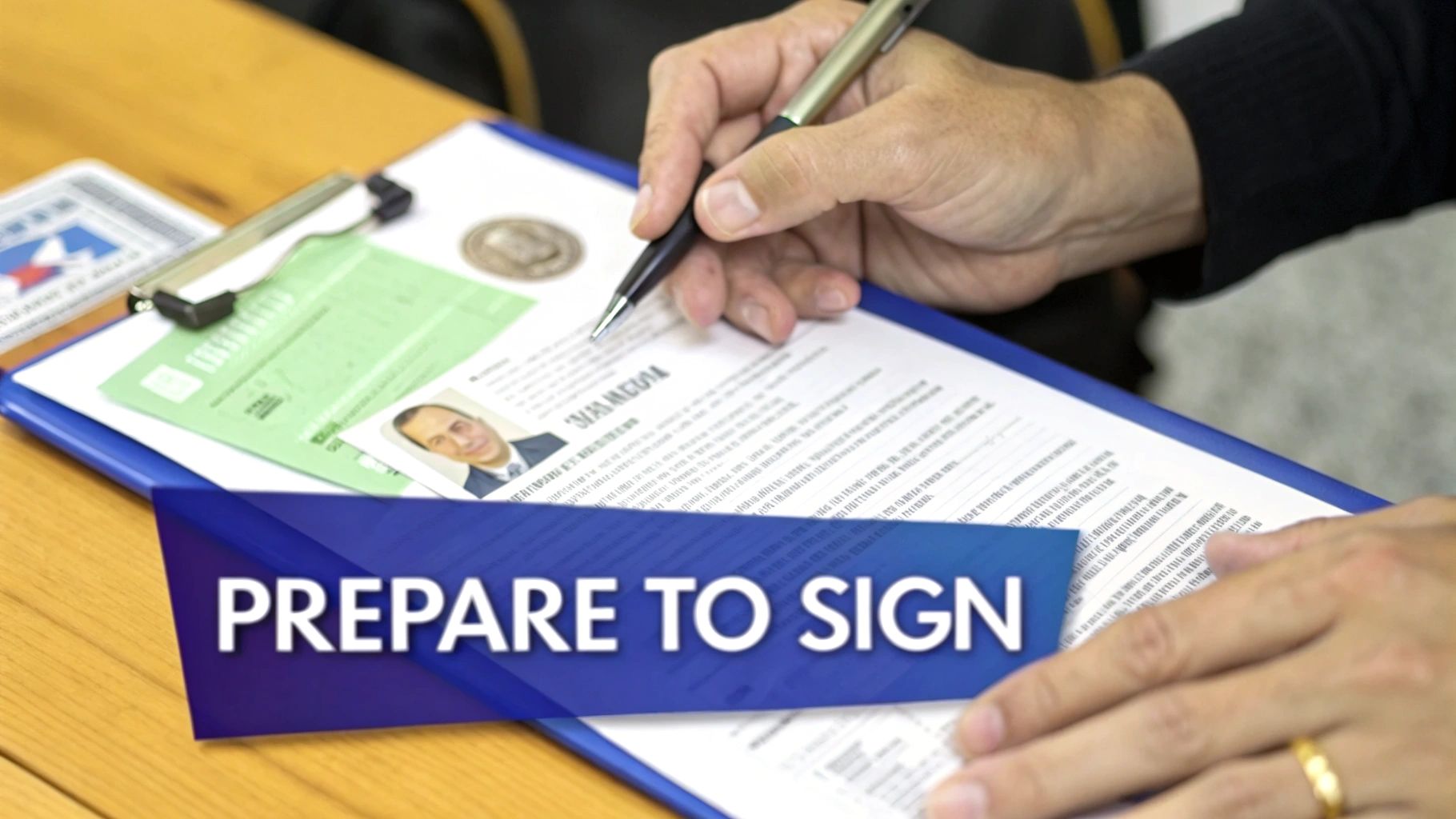
Remote Online Notarization, or RON, takes the entire notarization process and moves it online. Instead of finding a notary and meeting them face-to-face, you connect with a commissioned professional over a live, two-way video call. This means you can get a document legally notarized from pretty much anywhere, using just your computer or smartphone.
This isn’t just a minor convenience; it’s a game-changer for executing legal and financial documents. For businesses, title companies, and law firms, RON collapses turnaround times from days into minutes. All the logistical headaches of scheduling and travel just disappear.
The Core Technology Behind a Secure RON Session
The real power of RON comes from its multi-layered security protocols, which in many ways are far more robust than traditional in-person notarization. Platforms like BlueNotary are built from the ground up to verify a person’s identity with incredible certainty and create a permanent, unchangeable record of the entire event.
Here’s a quick look at the security components that make it all work:
- Credential Analysis: The platform uses sophisticated tech to scan your government-issued photo ID. It checks for hidden security features and tiny signs of tampering that the human eye would easily miss.
- Knowledge-Based Authentication (KBA): You’ll be asked a few personal questions drawn from public and private data sources. They’re designed to be things only you would know, adding a strong second layer of identity confirmation.
- Live Audio-Video Session: The whole notarization happens over a secure, encrypted video conference. The notary can see you, speak with you, and confirm you’re signing willingly and are aware of what you’re doing.
- Tamper-Evident Digital Seal: After you sign, the notary applies their unique digital certificate. This seal acts like a digital tripwire—if anyone tries to alter the document later, the seal breaks and invalidates it.
The entire session is recorded and securely stored. This creates a detailed audit trail that provides far more legal proof than a simple ink stamp and a signature in a paper logbook.
Walking Through a Typical Online Notarization
So, what does it actually look like to get something notarized online? It’s surprisingly straightforward.
First, you upload your document to the platform. The system then walks you through the identity verification part—snapping a picture of your ID and answering those KBA questions.
Once you’re verified, you’re placed into a live video call with a commissioned remote notary. They’ll greet you, confirm your identity one more time on camera, and make sure you understand the document you’re about to sign.
You then apply your electronic signature with a click. Immediately after, the notary applies their digital signature and seal. And that’s it—you’re done. The fully notarized document is instantly ready for you to download, save, or send.
The entire experience is built to be efficient. A process that used to involve scheduling, driving, and waiting can now be completed in a focused 10-15 minute session. It turns a clunky errand into a simple digital task.
Why Businesses and Legal Professionals Are Adopting RON
The move toward digital document execution isn’t just a trend; it’s a massive shift. The e-notary software market is on track to more than double, growing from USD 261.99 million in 2025 to a projected USD 655.22 million by 2035. This boom is fueled by a massive increase in secure digital transactions—from 88 million to over 750 million globally in just five years—as technology makes online fraud much harder.
For industries that handle a high volume of documents, like real estate and finance, the benefits are obvious. Title companies can close deals with signers scattered across the country. Law firms can get urgent affidavits and powers of attorney executed in an instant, massively improving how they serve their clients.
As you get deeper into this world, it’s crucial to know the legal and technical specifics. Understanding the differences between digital and electronic signatures is key for anyone using RON, especially for documents that carry heavy compliance requirements. This knowledge helps you appreciate the solid legal framework that makes remotely notarized documents so secure and enforceable.
Navigating State Laws and Complex Documents
The notarization process isn’t one-size-fits-all. It can change dramatically based on two things: your state and the type of document you’re signing. A simple affidavit is straightforward, but when you’re dealing with high-stakes paperwork like a power of attorney, a deed of trust, or a last will and testament, the rules get much stricter.
Getting a handle on this complex web of regulations is absolutely critical. Each state has its own statutes governing notarial acts, dictating everything from how much a notary can charge to the specific wording required for a certificate. One small mistake can have serious consequences, potentially invalidating the entire document.
Handling High-Stakes Legal Documents
As the legal weight of a document increases, so does the complexity of the notarization. Certain documents require much more than just a quick signature verification.
A Power of Attorney (POA), for instance, often requires witnesses in addition to the notary. The exact number of witnesses can vary from one state to another, so you have to check your local rules before the signing session. It’s a common point of confusion, but a notary can never double as one of the required witnesses.
Real estate transactions involving deeds are another area where precision is paramount. A sloppy notarization on a deed could cloud the property’s title for years, creating a legal and financial nightmare that’s incredibly difficult to untangle.
With these types of documents, the notary’s job is much more than just watching someone sign their name. They are following a specific, legally mandated script designed to protect everyone involved and ensure the document will stand up in court.
Special Considerations for Wills and Witnesses
Wills come with their own unique set of execution requirements. While not every state demands that a will be notarized, it’s a very common practice to add a “self-proving affidavit.” This extra step adds a powerful layer of validity.
The affidavit is a separate statement that the will’s creator (the testator) and the witnesses sign in front of a notary, swearing that all legal formalities were followed correctly.
Witnesses are absolutely non-negotiable here. A will typically requires two disinterested witnesses—people who are not beneficiaries in the will.
- Proper Presence: All witnesses must be physically or virtually present at the same time as the signer.
- Notary’s Role: The notary is responsible for verifying the identity of the signer and the witnesses.
- Protecting the Document: This carefully choreographed process is what helps prevent challenges to the will’s legitimacy down the road.
The Patchwork of Remote Online Notarization Laws
Remote Online Notarization (RON) adds another layer to the legal landscape, but it also provides incredible convenience. The legality of RON is decided state-by-state, which has created a patchwork of different rules across the country. Today, the vast majority of states have passed permanent RON laws.
The legal principle that makes RON so effective is interstate recognition. This means that as long as a notary is properly commissioned in a state that authorizes RON, they can legally notarize documents for signers located almost anywhere in the world. The transaction is legally considered to have happened where the notary is physically located.
This has been a huge breakthrough, especially for businesses that operate across state lines. During the 2020 pandemic, over 1.5 million remote notarizations were completed in the U.S. alone, showing that platforms like BlueNotary could securely and efficiently handle high-value transactions. For law firms and financial institutions, this shift has cut document turnaround times from days to just a few minutes.
Because the rules can differ, it’s always smart to double-check the most current information. You can find direct links to each state’s official resources with this list of Secretary of State websites.
Documents for International Use: The Apostille
What happens when your notarized document needs to be recognized in another country? A standard notarization won’t cut it. You’ll need an additional layer of certification known as an Apostille.
An Apostille is a special certificate issued by a designated state authority (usually the Secretary of State). It authenticates the notary’s commission, confirming that the notary who signed your document is a legitimate public official in good standing.
Here’s the typical workflow for a document headed abroad:
- Get it Notarized: First, the document has to be notarized by a commissioned notary public.
- Submit for an Apostille: The notarized document is then sent to the state office where the notary is commissioned.
- Receive the Certificate: That office attaches the Apostille certificate. The document is now ready for use in any country that is part of the Hague Apostille Convention.
How to Handle Common Notarization Problems
Even when you’ve done everything right, a notarization can still hit a roadblock. I’ve seen it happen countless times. Knowing what to look for and how to handle these little hiccups can save you from major headaches and delays, whether you’re meeting a notary in person or signing online.
Let’s walk through the most common things that can go wrong and, more importantly, how to fix them and keep things moving.
Issues with Signer Identification
The number one reason a notarization gets stopped dead in its tracks? A problem with the signer’s ID. Notaries are legally bound to be sticklers about this—it’s the cornerstone of preventing fraud.
An expired ID is an instant no-go. A notary simply cannot accept a driver’s license, passport, or state ID that’s even one day past its expiration date. There’s no wiggle room here, so always check the date before you head to your appointment.
Another classic snag is a name mismatch. If the name on your ID doesn’t reasonably line up with the name printed on the document, the notary has to pump the brakes. A missing middle initial might be fine, but a completely different last name from a recent marriage, for instance, means you’ll need to either get the document corrected or update your ID.
A notary’s most critical job is to confirm, without a doubt, who you are. If there’s any uncertainty about your identity or the ID you’ve presented, they are obligated to halt the process. It’s not personal; it’s about protecting everyone from fraud.
Document and Signer Readiness Problems
Beyond your ID, the state of the document—and the signer—can also throw a wrench in the works. A notary has to be sure the person signing is doing so willingly and understands what they’re signing.
If a signer appears confused, disoriented, or seems like they’re being pressured, a notary will refuse to proceed. They might strike up a little conversation to gauge if the person is alert and aware. Any sign of coercion or a lack of understanding means the notarization has to stop.
Blank spaces are another major red flag. A notary can’t put their seal on a document that has big empty fields that someone could fill in later. Make sure every line and box is filled out before the appointment. The only things you should leave blank are the signature and date lines, as those must be completed in the notary’s presence.
Troubleshooting Remote Online Notarization Tech Glitches
Remote Online Notarization (RON) is incredibly convenient, but it brings its own unique set of tech-related challenges.
A spotty internet connection is the usual suspect. It can make the video feed freeze, lag, or drop out completely, which immediately invalidates the session. Before you log on, run a quick speed test. Better yet, sit close to your router or plug directly into it with an Ethernet cable for the most stable connection.
Another hurdle can be the identity verification questions, often called Knowledge-Based Authentication (KBA). These questions pull from public records going back years and can be surprisingly tricky. Fail too many times, and the system will lock you out for security reasons. The best advice is to take a deep breath, read each question carefully, and think back to old addresses or car loans.
To help you anticipate and solve these issues before they start, here’s a quick guide.
Common Notarization Problems and Solutions
Things can and do go wrong, but most issues have a straightforward fix. This table breaks down the most frequent problems and how to solve them, whether you’re meeting a notary in person or online.
| Problem | In-Person/Mobile Solution | Remote Online Notarization (RON) Solution |
|---|---|---|
| Expired ID | Reschedule the appointment after obtaining a new, valid ID from the issuing government agency. | Same as in-person. You must have a current, unexpired government-issued photo ID to pass credential analysis. |
| Blank Spaces in Document | Fill in all required information on the spot, leaving only the signature and date lines blank. | Ensure the document is fully completed before uploading it to the RON platform. |
| Signer Appears Confused | The notarization must be stopped. It can be rescheduled for a time when the signer is lucid and fully aware. | The remote notary will terminate the session. The signer must be alert and coherent on camera to proceed. |
| Poor Internet Connection | Not applicable. | Move closer to your Wi-Fi router, switch to a wired connection, or reschedule from a location with better service. |
Being prepared for these potential snags is the best way to ensure your notarization goes off without a hitch. A little bit of prep goes a long way.
Your Notarization Questions, Answered
Even after you’ve got a handle on the notarization process, some specific questions almost always pop up. I see these all the time from folks in legal, real estate, and finance. Let’s clear up some of the most common sticking points so you can navigate any notarization with total confidence.
Getting these details right is non-negotiable, especially with high-value documents. One small misstep can lead to big headaches and costly delays down the road.
What’s the Real Difference Between an Acknowledgment and a Jurat?
This is easily the question I hear most often. While they both involve a notary, they serve very different functions.
An acknowledgment is all about confirming a signature’s authenticity. The signer declares to the notary that they willingly signed the document. A key detail here is that the document can be signed before meeting with the notary. The notary’s job is simply to verify the signer’s identity and confirm the signature is theirs.
A jurat is a more serious affair. It requires the signer to swear an oath or make an affirmation that the contents of the document are true and accurate. Because of this oath, the document must be signed in the physical or virtual presence of the notary. No exceptions.
- Acknowledgment: Confirms who signed and that it was voluntary.
- Jurat: Confirms who signed and that they swear the document’s contents are true.
Remember, you don’t get to choose. The document itself, or the agency that needs it, will dictate which one is required. A notary can’t make that call for you.
Can a Notary Actually Refuse to Notarize My Document?
Yes, and they absolutely should under certain circumstances. A notary isn’t just a rubber stamp; their fundamental duty is to prevent fraud. If they have a reasonable suspicion that something isn’t right, they are legally and ethically obligated to stop the process.
Here are some common reasons for a refusal:
- The signer can’t produce a valid, unexpired government-issued ID.
- The signer seems confused, disoriented, or unable to grasp what they are signing.
- There’s even a hint that the signer is being pressured or forced to sign.
- The document has big blank spaces that could be filled in fraudulently after the notarization.
A notary’s refusal isn’t personal. It’s a crucial safeguard that protects the integrity of the transaction for everyone involved.
How Does BlueNotary Keep Online Notarizations Secure?
Security is the absolute cornerstone of Remote Online Notarization (RON). A platform like BlueNotary uses a powerful, multi-layered security system that goes far beyond what’s required by most state laws. In many ways, it’s more secure than a traditional in-person signing.
Security in RON isn’t about one single piece of technology. It’s a chain of verification and authentication where each step reinforces the last, creating an ironclad and legally defensible record.
Here’s a look at what happens behind the scenes:
- Forensic ID Analysis: Sophisticated technology scans the signer’s ID, checking for hidden security features and signs of forgery that the human eye would miss.
- Knowledge-Based Authentication (KBA): The signer has to answer a handful of personal questions pulled from their public and private credit history—questions only they would know the answers to.
- Secure, Recorded Session: The entire notarization happens over an encrypted audio-video link. This session is recorded and securely stored as evidence.
- Tamper-Evident Digital Seal: After notarization, the document is sealed with a digital certificate. If anyone tries to alter the document later, that seal will instantly break, showing it has been tampered with.
This creates a comprehensive audit trail that provides undeniable proof of the notarial act.
Are Documents Notarized Online Accepted Everywhere?
For the most part, yes. Thanks to a legal principle called “interstate recognition,” a document that is properly notarized online in a state that has approved RON is generally considered valid and legally binding in all 50 states.
That said, it’s always smart to double-check with the specific person, agency, or courthouse that will be receiving your document. While the legal framework is solid, some organizations have their own internal policies or are just a bit behind the curve on adopting the technology.
If you have other questions about forms in general before you even get to the notarization stage, you might find answers in these additional frequently asked questions about forms.
Ready to see how fast and secure online notarization can be? BlueNotary gives individuals and businesses a compliant platform to get documents notarized in minutes, not days. Explore BlueNotary today.