

Online notarization is a lot easier than you might think. Forget the old hassle of coordinating schedules with a notary public and traveling for a face-to-face meeting. You can handle it all digitally, usually in just a few minutes, using BlueNotary. In this guide, you’ll learn everything needed to notarize documents online efficiently and securely, making life simpler for law firms and title agents alike.
Getting Started with Online Notarization
Online notarization is a revolutionary process that allows documents to be notarized digitally using a secure online platform. This method is especially beneficial for legal professionals and title agents as it streamlines operations and reduces the time and effort involved in traditional notarization.

Pro Tip: Always verify that the online notary platform complies with state laws to ensure the legal validity of your documents.
Prerequisites
Before you begin, ensure you have the following:
- A computer or tablet with a webcam and microphone
- A stable internet connection
- A valid government-issued ID
- Access to the document that needs notarization
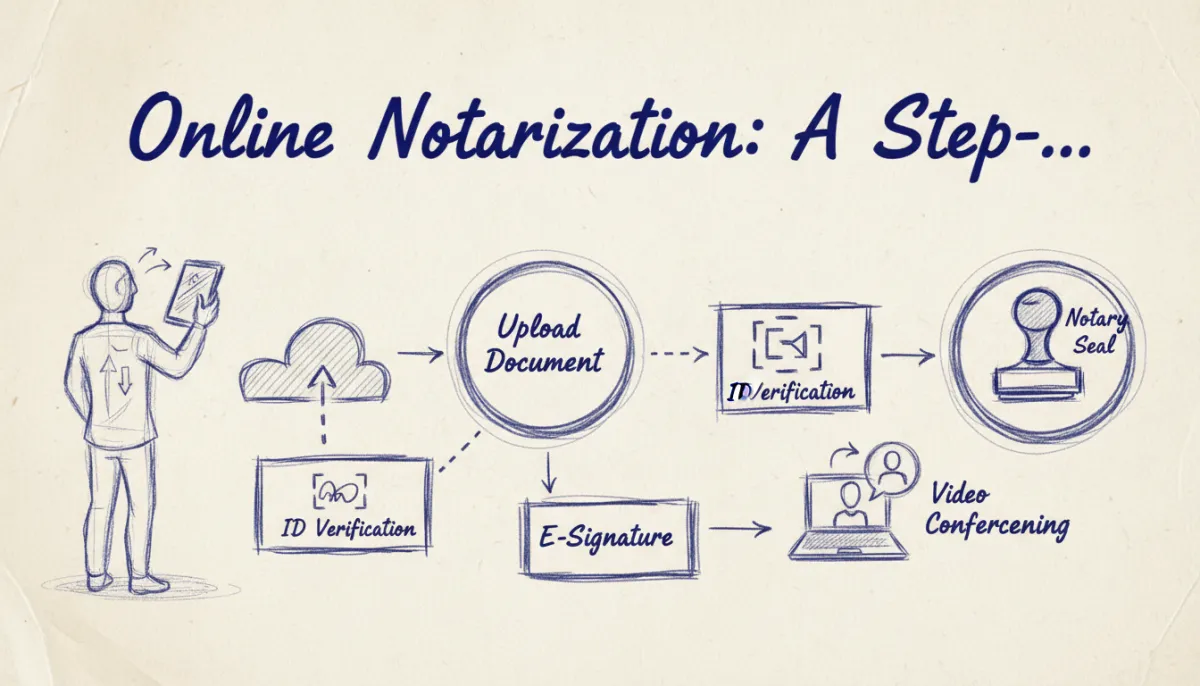
Step-by-Step: Online Notarization Process
1. Create an Account with BlueNotary
First, you’ll need to create an account on BlueNotary. This platform is designed to provide a seamless online notarization experience.
- Visit the Website: Go to bluenotaryonline.com and click on the Sign up button.
- Provide Your Details: Enter your email address, create a password, and fill in any additional required information.
- Verify Your Account: Check your email for a verification link to activate your account.
2. Upload Your Document
Once your account is set up, you can proceed to upload the document you need notarized.
- Log In to BlueNotary: Use your credentials to log in to your account.
- Select the Upload Option: Click on Upload document and choose the file from your device.
- Review and Confirm: Ensure the document is correct and ready for notarization.
(https://bluenotaryonline.com/identity-affidavit/) a document for notarization]
Expert Tip: Double-check the document for any errors before uploading, as changes after notarization might void its legality.
3. Verify Your Identity
Identity verification is crucial to ensure the security and legality of the online notarization process.
- Identity Confirmation: Follow the prompts to upload your government-issued ID and complete a Knowledge-Based Authentication (KBA) quiz.
- Biometric Verification: Use your webcam to take a selfie, which will be compared against your ID photo.
4. Connect with a Notary
After your identity is verified, you’re ready to connect with a licensed notary public.
- Schedule a Meeting: Use the platform to schedule a session with a notary or connect immediately if one is available.
- Join the Video Call: During the call, the notary will verify your identity and witness your signature.
- Receive Your Notarized Document: Once complete, the notary will apply a digital seal, and you’ll receive an electronic copy of the notarized document.
Key Takeaway: Online notarization is legally binding in most U.S. states, but always check state-specific regulations for compliance.
Common Challenges and Solutions
Despite the convenience of online notarization, you might encounter some challenges. Here’s how to address them:
Connectivity Issues
- Solution: Ensure a stable internet connection before starting your session. Test your webcam{:rel=”nofollow”} and microphone to avoid technical hiccups during the notarization process.
Document Errors
- Solution: Thoroughly review your document before submission. If errors are found post-upload, correct them and re-upload the document.
Identity Verification Problems
- Solution: Use a high-quality photo ID and ensure your KBA information is up-to-date. If issues persist, contact BlueNotary’s support for assistance.
Best Practices for Online Notarization
Enhance your online notarization experience by following these best practices{:rel=”nofollow”}:
- Prepare in Advance: Have all necessary documents and identification ready before starting the process.
- Choose a Quiet Location: Conduct your notarization session in a quiet, well-lit area to ensure clarity during the video call.
- Stay Informed: Keep updated with any changes in state laws regarding online notarization to maintain compliance.
Pro Tip: Consider using dual monitors to easily manage documents and video calls simultaneously.
Common Questions About Online Notarization
What Documents Can Be Notarized Online?
Almost any document that requires notarization can be processed online, including affidavits, powers of attorney, and contracts. Check specific state regulations to verify if there are any exceptions.
Is Online Notarization Secure?
Yes, online notarization through platforms like BlueNotary uses advanced encryption and security protocols to protect your information. Always ensure the platform complies with legal standards.
How Long Does the Online Notarization Process Take?
Typically, the entire process can be completed in about 15-30 minutes, depending on document complexity and identity verification speed.
Can I Notarize Documents for Different States?
Yes, online notarization is recognized across state lines, but it’s crucial to verify the receiving state’s acceptance of electronically notarized documents.
What If I Face Technical Difficulties?
If you encounter technical issues, BlueNotary provides support to help troubleshoot problems quickly, ensuring a smooth notarization process.
Conclusion
Online notarization has revolutionized the way documents are authenticated, offering unparalleled convenience and efficiency. By following this comprehensive guide, law firms and title agents can leverage BlueNotary to streamline their operations, reduce costs, and enhance client satisfaction. Ready to get started? Get Started with BlueNotary to learn more.