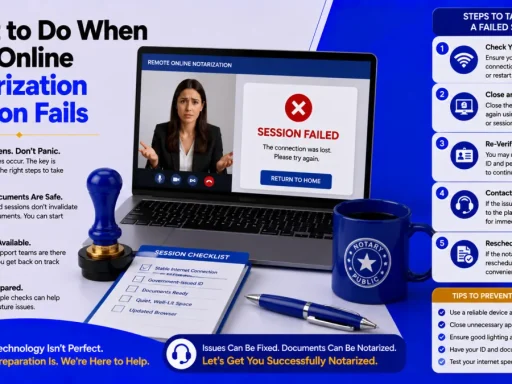


Quick answer: When an online notarization session fails, it’s almost always one of four causes: identity verification (KBA) failed, a technical problem (camera, mic, or connection), an incomplete document the notary must decline, or an eligibility/state-law issue. The good news, a failed session creates nothing invalid, nothing was notarized, so there’s nothing to undo. Diagnose which category you hit, apply the fix, and retry or use a fallback like biometric verification, a credible witness, or an in-person notary.
You’re on a deadline, you started an online notarization, and it stalled, the ID quiz won’t pass, the camera froze, or the notary said the document isn’t ready. First, exhale, when an online notarization session fails, nothing invalid happens. No notarization was completed, so there’s nothing to unwind you just need to find the cause and finish.
This guide is a triage tool. It sorts failures into the four real causes, gives you the fix for each, and lays out the fallbacks if a retry won’t work, so you can get the document notarized today.
What “a failed session” actually means
An online notarization session fails when the notary cannot legally complete the notarial act, usually because the signer’s identity couldn’t be verified, the technology didn’t meet requirements, the document wasn’t ready, or the signer or document wasn’t eligible under state law. Importantly, a failure isn’t a defective notarization; it’s an incomplete one. The seal never goes on, so there’s no invalid document floating around. For how a successful session is supposed to run, see BlueNotary’s guide to how remote notarization works.
That reframing matters: you’re not fixing a mistake, you’re completing an interrupted process.
Diagnose it first: the four failure types
Before you retry, identify which bucket you’re in, the fix is different for each:
| Failure type | What you’ll see | Core fix |
|---|---|---|
| Identity / KBA | Can’t pass the ID quiz; “verification failed” | Match your details exactly; use a fallback ID method |
| Technical | Frozen/black video, no audio, “camera not found” | Allow permissions; switch to Chrome on a laptop; check connection |
| Document | Notary declines; “incomplete document” | Complete all blanks/pages; fix the certificate |
| Eligibility / state law | Notary can’t proceed; document/signer not allowed | Confirm RON is permitted for that document and signer |
Cause 1: Identity verification (KBA) failed — the most common
Most failures happen here. Online notarization verifies you through credential analysis (validating your ID) and knowledge-based authentication (KBA), a timed quiz built from your U.S. credit and public records, as outlined in the Texas Secretary of State’s identity-proofing rules. KBA fails for two broad reasons: your information didn’t match, or there isn’t enough data to build the quiz.
Fix the easy stuff first:
- Match your details exactly to official records:- Full legal name (not “Joe” for “Joseph”), correct date-of-birth format, and current legal name.
- Try a former address:- If you recently moved, or a former name if you recently changed it, the records driving KBA may lag.
- Re-scan your ID:- In good light, no glare or blur, both sides.
- Refresh or rejoin:- Ff the network dropped mid-quiz.
Mind the retry limits. Per the Proof Help Center, platforms typically let you retry but then impose 24- and 48-hour waits, often capping attempts at around three in 48 hours — and support generally cannot unlock the quiz, because that limit protects your identity. So don’t burn attempts guessing; fix your inputs before each try.
If KBA simply won’t generate or pass, common for people with thin credit history, recent immigrants without a U.S. credit footprint, or “credit invisible” signers, KBA isn’t the right path at all. Jump to the fallbacks below.
Cause 2: Technical problems (camera, mic, connection)
The second-biggest category is hardware and connection. Online notarization needs the notary to see and hear you clearly the entire time, so the session won’t proceed through a broken feed.
Run through these in order:
- Click “Allow”:- When the browser asks for camera and microphone access, denied permissions are the #1 cause.
- Use a supported setup:- A desktop or laptop with a working webcam (commonly 720p or better) and mic, on Google Chrome, Phones and unsupported browsers cause many failures.
- Check your connection:- A reliable high-speed link (often ~10 Mbps upload recommended) prevents freezing.
- Close other apps:- Using the camera (Zoom, Teams) so the browser can access it.
- Test before you start:- Ideally well ahead of any deadline.
Important: if the signing wasn’t captured on video, a participant wasn’t on camera the whole time, or audio/video failed during the signing, the session may have to be redone even if it seemed to finish, because the recorded session is part of the legal record. If you’re unsure, ask the notary whether the act was validly captured.
Cause 3: The document was declined
A notary, online or in person, must decline an incomplete document. Per the American Society of Notaries, documents with blank spaces or missing pages can’t be notarized, because content could be added afterward. Online, format problems (unreadable scans, wrong file type) also cause stops.
Fix it:
- Complete every blank and include all pages before you rejoin. For fields that don’t apply, line through them or mark “N/A.”
- Confirm the right notarial certificate is on the document (acknowledgment vs. jurat).
- Re-upload a clean, complete file. If you’re unsure how to complete the form, contact the issuing agency or your attorney first.
This is the same standard that trips up in-person signings, BlueNotary’s common notarization mistakes guide covers how to avoid it.
Cause 4: Eligibility or state-law issues
Sometimes the session can’t proceed because of the rules, not the tech:
- The document type isn’t eligible for RON in your state. Some states exclude certain documents from remote notarization.
- The signer’s situation doesn’t qualify, for example, the notary can’t confirm understanding or willingness, or the signer appears impaired or coerced.
- The signer can’t be identified by any permitted method.
These aren’t “errors” to retry, they’re legal limits. Confirm whether RON is allowed for your document and situation via BlueNotary’s guide to who regulates notaries by state, and check the witness requirements for online notarization if a credible witness is involved.
The fallbacks: when a retry won’t work
If you’ve fixed your inputs and still can’t complete the session, you have real options:
- Biometric / passport-based verification:- Where your state and platform allow it (Florida and Michigan are examples that permit biometric identity proofing), this skips KBA entirely, ideal for foreign nationals and thin-credit signers.
- A credible witness:- A person who personally knows you can vouch for your identity to the notary, subject to state rules.
- A different notary or platform:- If the issue is provider-specific, another option may verify you successfully.
- A mobile or in-person notary:- When remote verification just isn’t possible, an in-person notarization is the dependable fallback, see places to find a notary near you.
- Tell whoever requested the document:- Lenders, agencies, and courts often have an approved alternative; confirming with them prevents a second failed attempt.
A real example: Sofia, a recent immigrant with no U.S. credit history, failed KBA three times and got locked out. Rather than wait 48 hours, she switched to a platform offering biometric, passport-based verification, completed the session in minutes, and met her deadline. The fix wasn’t more retries, it was a different verification method.
How to prevent a failed session next time
A few minutes of prep prevents most failures:
- Use your full legal name and current details exactly as they appear on official records.
- Have an unexpired government photo ID and good lighting for the scan.
- Test your camera, mic, and connection on Chrome/a laptop before the appointment.
- Finalize the document, no blanks, all pages, correct certificate.
- Confirm RON is allowed for your document and pick a compliant platform. New to the process? Start with how to use an online notary service.
The bottom line
A failed online notarization session feels like a wall, but it’s really a fork: identify whether the problem is identity, technology, the document, or eligibility, and the fix follows directly. Match your details to beat KBA, allow permissions and use Chrome on a laptop for tech, complete the document before you start, and confirm RON is allowed for your situation. When retries won’t work, biometric verification, a credible witness, or an in-person notary will get it done and nothing about the failed attempt invalidates anything. To try again on a platform built to verify a wide range of signers, BlueNotary can get you back into a session quickly.
Stuck after a failed session and need to finish today? Start a new session on BlueNotary, with identity options beyond standard KBA and a quick tech check, to verify, sign on camera, and download your notarized document. First, run the diagnostic above, then read how to use an online notary service so the next attempt succeeds.
Frequently Asked Questions
Why did my online notarization fail?
Almost always one of four reasons: identity verification (KBA) failed, a technical problem with your camera/mic/connection, the document was incomplete and the notary declined it, or an eligibility or state-law issue. Identify the category first, then apply the matching fix.
What happens if I fail KBA for online notarization?
The session can’t proceed until your identity is verified. Re-check that your name, date of birth, and address match your official records exactly, re-scan your ID clearly, and try a former name or address if you recently changed them. If it still fails, use a fallback verification method.
How many times can I retry KBA?
Retries are limited. Many platforms let you try again but then impose 24- and 48-hour waits, often capping attempts at about three within 48 hours, and support usually can’t unlock the quiz because the limit protects your identity. Fix your inputs before each attempt.
Can I still notarize if I can’t pass identity verification?
Often yes, through a different method. Where your state and platform allow it, biometric or passport-based verification skips KBA, and a credible witness who knows you can vouch for your identity. If remote options fail, an in-person notary is a reliable fallback.
Why won’t the online notary accept my document?
Most often because it’s incomplete, blank spaces or missing pages, which a notary must decline. Format issues like unreadable scans or the wrong notarial certificate also cause stops. Complete every field and page, fix the certificate, and re-upload a clean file.
What are the technical requirements for online notarization?
Typically a desktop or laptop with a working webcam (often 720p or better) and microphone, Google Chrome, and a reliable high-speed connection (around 10 Mbps upload is commonly recommended). Allow the browser camera and microphone permissions when prompted.
Do I have to redo the notarization if the video cut out?
Possibly. If the signing wasn’t captured on video, a participant wasn’t on camera throughout, or audio/video failed during the signing, the session may need to be redone, because the recorded session is part of the legal record. Ask the notary whether the act was validly captured.
What should I do if my online notarization keeps failing?
Stop retrying blindly and switch approach: use biometric verification or a credible witness where allowed, try a different platform or an in-person notary, and contact whoever requested the document to confirm an acceptable alternative before your deadline.