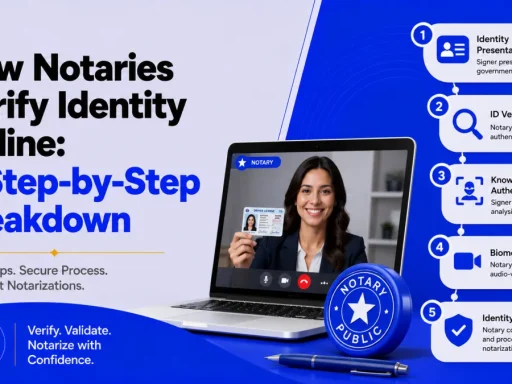
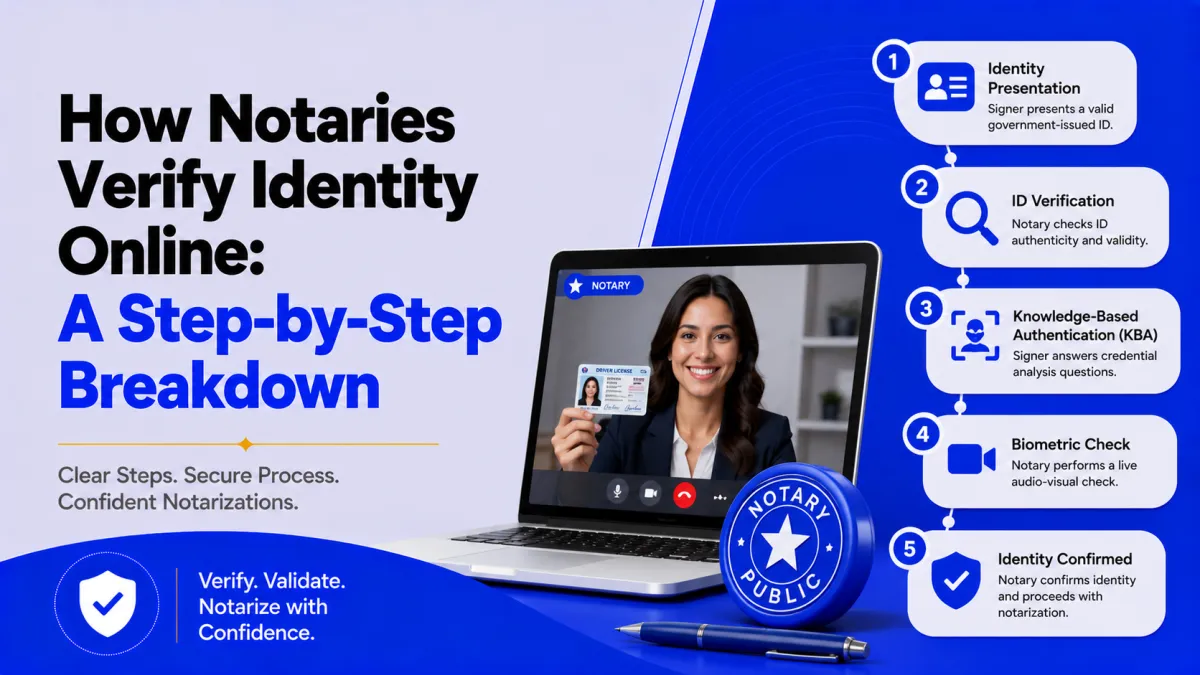

Quick answer: Online notaries verify identity online using three stacked layers: credential analysis (technology validates your government ID is real), knowledge-based authentication (you answer personal-history questions only you should know), and live visual or biometric comparison (the notary matches your face on camera to your ID). You typically must pass a KBA quiz with at least 80% correct, and the whole session is recorded, making remote identity checks as rigorous as, or stronger than, glancing at an ID in person.
The first thing people ask about online notarization is the obvious one: how can a notary possibly confirm who I am through a screen? It’s a fair worry and the answer is that how notaries verify identity online is more layered than the in-person version, not less. Instead of one person eyeballing a plastic card, the process stacks automated document forensics, a personal-history quiz, and a live face check.
This guide breaks down each layer in order, gives you the real pass thresholds, explains what changes from state to state, and is honest about who the process can’t verify.
What online identity verification for notarization actually is
Online identity verification for notarization is the multi-step process a remote notary uses to confirm a signer is who they claim to be before notarizing a document over live video. It combines technology-driven checks with a human review, and every step is captured in a recorded session and audit trail. It’s the remote equivalent of presenting ID to a notary in person just with more checkpoints.
This process is the backbone of remote online notarization (RON). Without it, a remote notarization wouldn’t be legally valid, which is why states write the identity-proofing rules directly into their RON statutes.
The three layers, in plain terms
Before the step-by-step, here’s the core model every compliant RON platform follows:
- Credential analysis — software inspects your government ID for authenticity.
- Knowledge-based authentication (KBA) — you answer questions only you should be able to answer.
- Visual (and often biometric) comparison — the notary confirms your live face matches your ID.
A signer has to clear all three before the notary will proceed. Miss one and the session stops.
Step-by-step: how the online identity check unfolds
Here’s the actual sequence from the signer’s side of the screen.
- Upload or scan your government ID:- You submit an unexpired, government-issued photo ID — typically a driver’s license, state ID, Real ID, or passport. The platform captures the front and back.
- Credential analysis runs automatically:- A third-party identity service uses technology to confirm the ID’s security features (microprint, holograms, formatting) and checks the details against the issuing or another authoritative source to confirm the document isn’t fraudulent. This happens in seconds, before you ever talk to the notary.
- You complete knowledge-based authentication (KBA):- The system generates a short quiz often five questions pulled from public records and credit history, former addresses, a past loan amount, vehicles registered to you, or associated names. You answer against the clock.
- You must pass the KBA threshold:- You generally need to answer at least 80% correctly (commonly 4 of 5). Fail, and most states allow only a limited number of retries within a set window before you’re locked out for a period — the exact retry rule varies by state.
- You join the live video session:- Once the automated checks pass, you connect with the commissioned notary over real-time audio-video.
- The notary performs a visual comparison:- The notary looks at your live face on camera and compares it to the photo on the ID you submitted, a human checkpoint that no algorithm replaces. Many platforms reinforce this with biometric liveness detection, which confirms a real, present person rather than a photo, recording, mask, or deepfake.
- The notary proceeds and records:- With identity confirmed, the notary witnesses your electronic signature, applies the electronic seal, and the entire session, including the identity steps is recorded and stored as part of the audit trail.
If you want to see how this fits the larger appointment, BlueNotary’s overview of how remote notarization works maps the full session.
Credential analysis vs. KBA vs. visual check: what each one catches
Each layer is designed to stop a different kind of fraud. That’s why they’re stacked rather than used alone:
| Layer | What it verifies | Fraud it stops |
|---|---|---|
| Credential analysis | The ID document is genuine | Fake, altered, or expired IDs |
| KBA | The person knows the identity’s private history | Someone holding a stolen or borrowed real ID |
| Visual / biometric comparison | The live person matches the ID photo | Impersonation, photo/video spoofing, deepfakes |
A fraudster might forge one layer, but clearing all three, a genuine ID, the private knowledge behind it, and a matching live face is far harder than fooling a single in-person glance.
Online vs. in-person identity verification
So is the screen really as safe as the desk? Compared head-to-head, the online process usually has more checkpoints:
| Dimension | In-person notarization | Online (RON) |
|---|---|---|
| ID inspection | Notary’s visual look at the card | Automated credential analysis + notary’s look |
| Knowledge check | None | KBA quiz from records |
| Liveness/anti-spoofing | Human judgment | Optional biometric liveness detection |
| Record of the act | Journal entry | Recorded session + full audit trail |
| Re-reviewable later | No video | Yes — session is stored |
The recorded session is the quiet advantage: an in-person notarization leaves only a journal line, while a RON session can be reviewed afterward if anyone questions it.
Why the rules differ by state
Identity proofing is set by each state’s RON law, so the exact requirements aren’t identical everywhere:
- Texas requires the notary to verify identity through credential analysis and knowledge-based authentication (or personal knowledge of the signer), conducted online, see the Texas Secretary of State’s identity-proofing rules.
- Florida permits commissioned online notaries to use biometric authentication without requiring KBA, provided the system meets the state’s approved standards.
- Other states publish their own technical guidance, Wisconsin’s DFI identity-proofing guidance is a clear example.
Because of this, the same signer might face a KBA quiz in one state and a biometric scan in another. To check your state’s framework, see BlueNotary’s guide to who regulates notaries by state.
The honest part: who can’t pass, and what to do
No identity system verifies everyone, and KBA is the usual sticking point. A real-world example: Marco, a recent immigrant, has a valid passport but no U.S. credit history, so the KBA step has no records to build questions from, and he can’t pass it. He isn’t doing anything wrong; the data simply doesn’t exist yet.
People who commonly struggle with KBA include those without a Social Security number, with fewer than about three to five years of U.S. credit history, minors, and some foreign nationals. When KBA isn’t viable, the standard alternative is a credible witness, a person who personally knows the signer and can vouch for their identity to the notary, subject to the state’s rules. BlueNotary’s overview of witness requirements for online notarization explains how that works.
Liveness and anti-spoofing technology also keeps evolving alongside threats like deepfakes; standards such as NIST SP 800-63 and ISO/IEC 30107 are the benchmarks platforms measure their biometric checks against.
How to prepare so verification goes smoothly
A few minutes of prep prevents most failed sessions:
- Have an unexpired, government-issued photo ID ready and make sure the name matches your document.
- Use a device with a working camera and good lighting so the credential scan and face comparison are clean.
- Know your own history, recent addresses and accounts, so KBA questions don’t trip you up.
- Pick a compliant platform. The provider should perform credential analysis, KBA or biometrics per your state, and record the session. BlueNotary’s overview of online notary platforms covers what to look for.
The bottom line
How notaries verify identity online isn’t a single screen check, it’s three stacked layers: credential analysis proves your ID is real, KBA proves you know that identity’s private history, and a live visual or biometric comparison proves you’re the person on the card. The thresholds are concrete (often 80% on KBA), the session is recorded, and the standards vary by state. It’s a more rigorous process than most in-person checks with the honest caveat that signers lacking credit history may need a credible witness instead.
Want to experience the identity check firsthand before you rely on it? Start a notarization on BlueNotary to see credential analysis, KBA or biometric verification, and the recorded session work in real time, so you know exactly how your identity is confirmed before signing anything. New to the process? Read how to use an online notary service first to know what to have ready.
Frequently Asked Questions
How do online notaries verify identity?
They use three layers: credential analysis (technology validates your government ID), knowledge-based authentication (you answer personal-history questions), and a live visual or biometric comparison of your face to your ID over recorded video. A signer must clear all three.
What is knowledge-based authentication (KBA) in online notarization?
KBA is a quiz of personal questions pulled from public records and credit history past addresses, loan amounts, registered vehicles, or associated names. It confirms the signer knows private details tied to the identity, not just holds a matching ID.
What is credential analysis?
Credential analysis is an automated process where a third-party service inspects your government-issued ID’s security features and checks its details against the issuing or another authoritative source to confirm the document is genuine and not fraudulent.
How many KBA questions do you have to answer correctly?
You generally must answer at least 80% correctly, commonly four out of five questions. If you fail, most states allow only a limited number of retries within a set time before locking you out for a period; the exact rule varies by state.
Is remote online notarization secure?
Yes. It typically adds more checkpoints than an in-person notarization: automated ID forensics, a knowledge quiz, optional biometric liveness detection, and a fully recorded session with an audit trail that can be reviewed later if the act is ever questioned.
What happens if you fail identity verification?
If credential analysis or KBA fails, the notary cannot proceed. You may get a limited retry, but if you still can’t pass, the session ends. Depending on the state, a credible witness who knows you may be used as an alternative way to confirm identity.
Can you use an online notary without a Social Security number?
Often not through standard KBA, since the quiz relies on credit and public-record history that may not exist. Signers without an SSN or with thin credit history, including some foreign nationals and minors, typically need a credible witness or a state-permitted alternative.
What ID can you use for online notarization?
An unexpired, government-issued photo ID, usually a driver’s license, state ID card, Real ID, or passport. The name on the ID should match the name on the document being notarized.