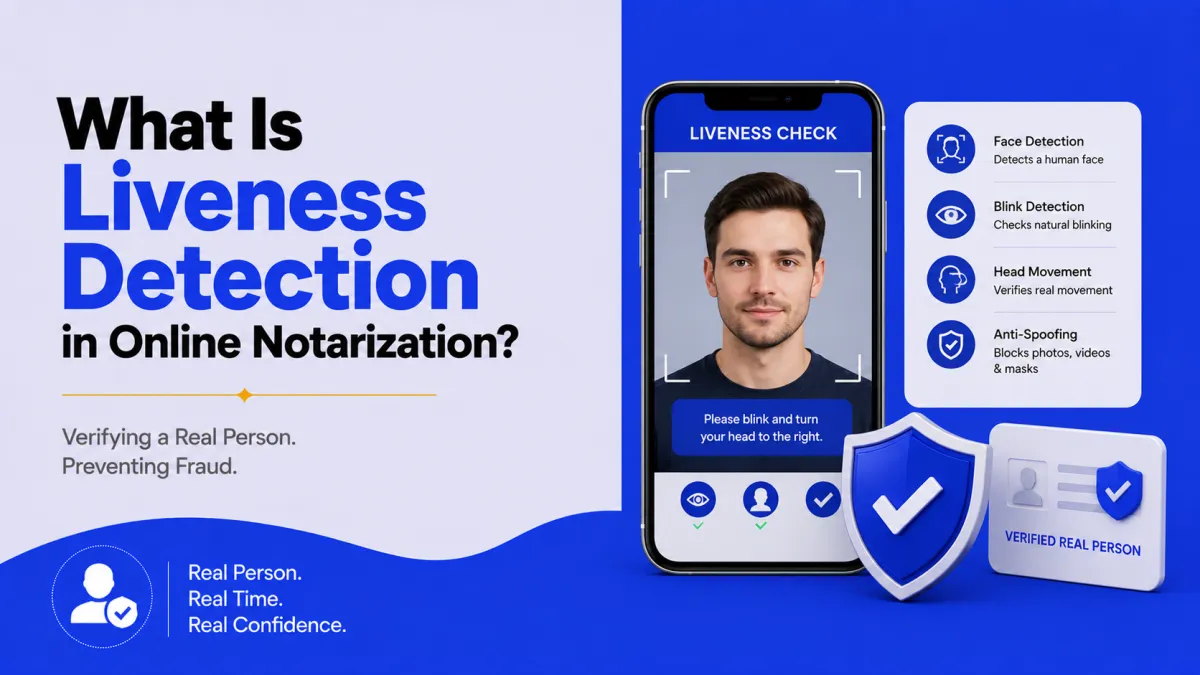

Quick answer: Liveness detection confirms that a real, live person, not a photo, video replay, mask, or deepfake. Is on camera during online notarization. It works with the biometric face match: after matching your selfie to your ID, liveness detection proves that selfie is a live human. It’s the main defense against deepfake and spoofing attacks.
What is liveness detection?
Liveness detection is the technology that confirms the face on camera belongs to a real, living person present right now, not a static photo, a recorded video, a mask, or an AI-generated face. In online notarization, it’s the safeguard that sits with the biometric face match: matching a selfie to your ID proves the face is yours, and liveness detection proves that face is live.
Without it, an impostor could hold up a photo of you or replay a video and try to pass the face check. Liveness detection closes that gap, which is why it’s become central to trustworthy identity verification, part of the same fraud-prevention system covered in detecting notarization fraud.
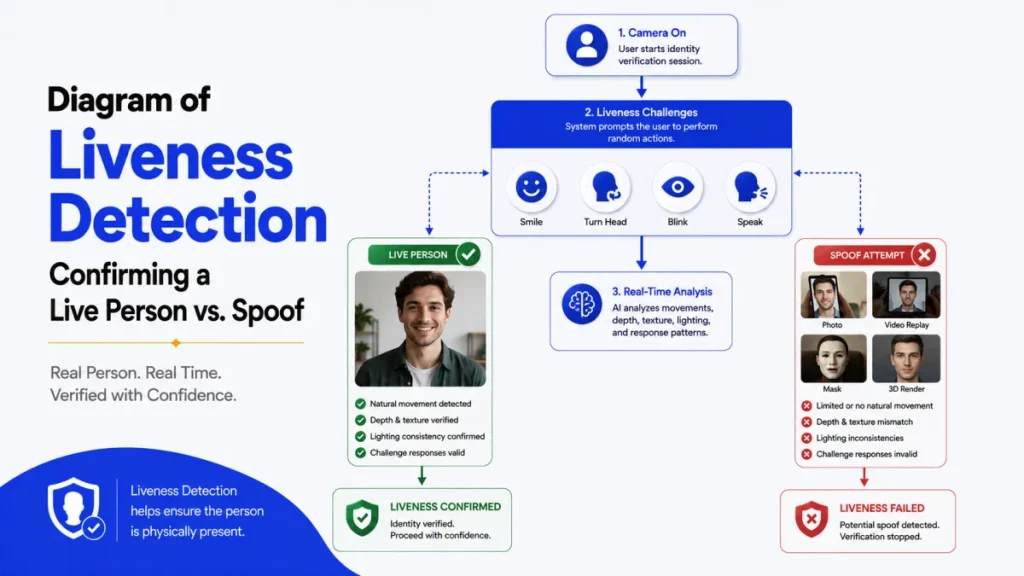
Active vs. passive liveness
There are two approaches, and many systems use both:
- Active liveness asks you to do something, blink, smile, turn your head, or follow an on-screen prompt. A pre-made photo or a static deepfake struggles to respond correctly in real time.
- Passive liveness runs silently in the background, analyzing signals a human face naturally produces, skin texture, depth, micro-movements, and lighting reflections, without asking you to do anything. It’s fast and hard to fool because there’s no predictable prompt to fake.
Active liveness is more visible to you, passive liveness is more seamless. Together they make spoofing much harder.
What liveness detection stops
Liveness detection is built to defeat presentation attacks, attempts to fool the camera with a fake:
- Deepfakes: AI-generated or manipulated video of a face.
- Printed photos: Holding up a picture of the real person.
- Screen/video replays: Playing a recorded video to the camera.
- 3D masks: Physical masks mimicking a face.
In 2026, deepfakes are the headline threat, and liveness detection is the primary technical defense, which is why standards bodies like the FIDO Alliance now certify biometric systems for exactly this capability. The broader identity-assurance framework comes from NIST’s Digital Identity Guidelines.
Liveness detection vs. facial recognition
People mix these up, so here’s the difference:
- Facial recognition / biometric match: Does this face match the ID photo? It’s about identity.
- Liveness detection: Is this a real, live face? It’s about authenticity of the capture.
You need both. A deepfake might resemble your face enough to fool recognition, but liveness detection catches that it isn’t a live person. And a live stranger would pass liveness but fail the face match. The combination is what protects the session.
Where liveness fits in online notarization
Liveness detection is one layer in a stack designed so no single weakness lets an impostor through:
- Credential analysis, is the ID real?
- Knowledge-based authentication (KBA), does the person know what the real person would?
- Biometric face match, does the face match the ID?
- Liveness detection, is that face a live human?
Together they answer real ID + real knowledge + right face + live person. Most state RON laws require this kind of layered identity-proofing; see what you need to notarize and your state’s rules.
Why you might fail a liveness check (and how to pass)
Most failures are environmental, not suspicious:
- Poor lighting → Face a light source; avoid strong backlight or shadows.
- Glare or a covered face → Remove sunglasses/hats and reduce screen glare.
- Following prompts too slowly → Do the requested action (blink, turn) promptly.
- A shaky or distant camera → Hold steady, fill the frame with your face.
To pass first try: good, even lighting, a steady camera, a clear view of your face, and prompt responses to any on-screen instructions.
Conclusion
Liveness detection is the layer that makes the face check trustworthy, it confirms the person on camera is a live human, not a photo, replay, mask, or deepfake. It works alongside the biometric match, one confirms your face is yours, the other confirms it’s live, using active prompts, passive analysis, or both. As AI-generated fraud grows in 2026, this is the primary defense standing between a deepfake and a fraudulent notarization, and it sits within a four-layer verification stack that also checks your ID and your knowledge. For you, it’s usually as simple as good lighting and following a quick prompt.
Want a notarization backed by fraud-resistant, layered identity checks? Notarize online with a commissioned notary on BlueNotary in about 15 minutes, 24/7. Verification included. Curious what you’ll need on your end? See what you need to notarize.
Frequently asked questions
What is liveness detection in online notarization?
It’s technology that confirms a real, live person is on camera, not a photo, video, mask, or deepfake. It pairs with the biometric face match to ensure the face being verified is genuinely present and live.
What’s the difference between active and passive liveness?
Active liveness asks you to do something, like blink or turn your head. Passive liveness silently analyzes texture, depth, and lighting without a prompt. Many systems use both for stronger protection.
Can liveness detection stop deepfakes?
It’s the main defense against them. Liveness detection looks for signals a real live face produces, depth, micro-movements, and responses to prompts, that AI-generated or replayed video struggles to reproduce in real time.
How does liveness detection work?
It captures your face and checks whether it’s a live person using active prompts (blink, turn) and/or passive analysis of texture, depth, and light, flagging photos, videos, masks, and deepfakes.
Is liveness detection the same as facial recognition?
No. Facial recognition checks whether the face matches the ID. Liveness detection checks whether the face is a real, live person. Online notarization uses both together.
Why did I fail the liveness check?
Usually because of poor lighting, glare, a covered face, a shaky or distant camera, or not following the prompt promptly. Better lighting and a steady, clear view of your face typically fixes it.